> For the complete documentation index, see [llms.txt](https://blazingapp.gitbook.io/tutorials/llms.txt). Markdown versions of documentation pages are available by appending `.md` to page URLs; this page is available as [Markdown](https://blazingapp.gitbook.io/tutorials/blazing-tools/slice-buy/custom-links-setup.md).
# Custom Links Setup
Earn fees from any trading bot.
{% hint style="success" %}
## Slice Buy lets you set your own referral links for each scan in your community.
We understand that people prefer different trading bots. With Slice Buy, you decide which bots you want to keep as quick buy links, and all referral fees from these links will go straight to your account.
{% endhint %}
{% stepper %}
{% step %}
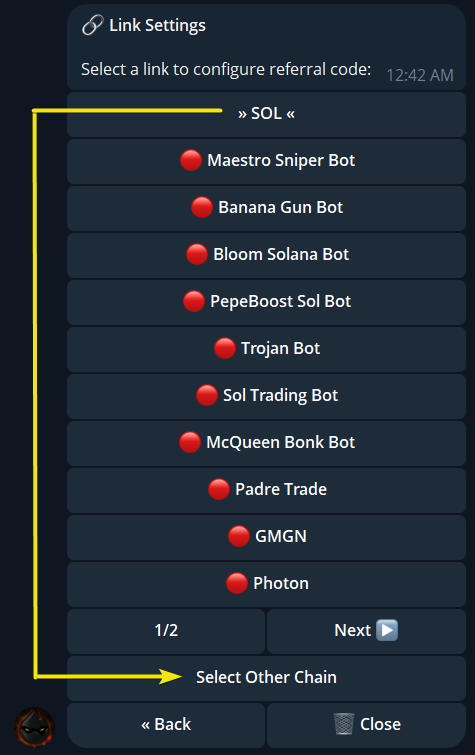
### Select a chain to find a trading bot
Select the chain to find a trading bot.
{% endstep %}
{% step %}
### Select trading bot
Tap on the trading bot name to launch a custom ref link setup menu.
{% endstep %}
{% step %}
### Click ➕Set Referral
{% endstep %}
{% step %}
### Get your Referral code (referral username) from another trading bot
{% endstep %}
{% step %}
### Enter this code to Slice Buy menu
{% endstep %}
{% step %}
### Done. You've set a custom GMGN referral link.
{% hint style="info" %}
Although we set a custom link for the SOL chain, it will apply to all chains supported by the trading bot from your custom ref link.
{% endhint %}
{% endstep %}
{% step %}
### How it looks
{% endstep %}
{% endstepper %}