# Setup guide
{% stepper %}
{% step %}
### Install Extension from Chrome Web Store
Click **Add to Chrome** to install the Extension to your Chrome browser. It is absolutely safe; the extension will not access your personal data or other extensions.
{% hint style="info" %}
The Extension works with all Chromium-based browsers, including Google Chrome, Opera, Edge, Brave, Vivaldi, and more.
{% endhint %}
{% endstep %}
{% step %}
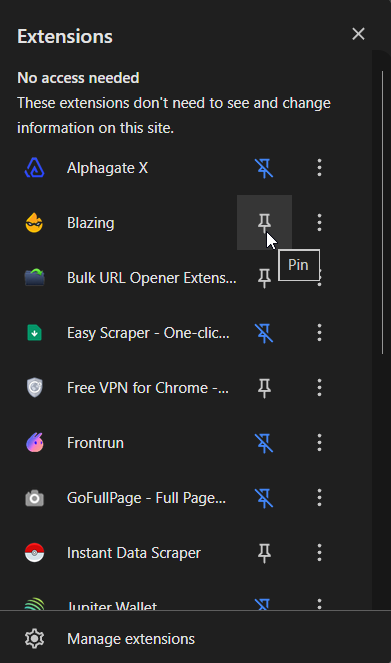
### Pin the Extension for fast access
Click on the Extensions list located at the top right of your browser. The list of all your extensions will pop up:
{% endstep %}
{% step %}
Hover over and click the Pin icon near the Blazing Extension to pin it for easier access:
Great! The extension is now installed and ready to use.
{% endstep %}
{% step %}
### Sign in to the Extension
Click on the extension icon to launch it.
Now, click Sign in with Telegram to connect it with your [**Blazing account**](https://blazingapp.gitbook.io/tutorials/telegram-bot/start-using-blazing). You will be redirect to [Blazing Telegram Bot](https://t.me/blazing_trading_bot?start=ref_JeetPunisher).
I don't have a Blazing Account. How do I create it?
All transacions initiated from the Extension are executed throught Blazing infrastructure. You can create Blazing Account just in two clicks:
1. Launch [Blazing Telegram Bot](https://t.me/blazing_trading_bot?start=ref_JeetPunisher).
2. Click Start
3. Bot will instantly create an account and generate wallets for all [supported-chains-and-dexes](https://blazingapp.gitbook.io/tutorials/supported-chains-and-dexes "mention")
4. [deposit](https://blazingapp.gitbook.io/tutorials/telegram-bot/wallets/deposit "mention") or [import](https://blazingapp.gitbook.io/tutorials/webapp/wallet-management/import "mention") funded wallet into your Blazing account.
{% endstep %}
{% step %}
### Approve Login Request
Click **Approve** to sign in to the Extension.
Now you can **Close** this message or Return to Web App to open Blazing WebApp.
{% endstep %}
{% step %}
### Return to the Extension.
{% hint style="success" %}
Amazing! The Extension is now ready. Now let's get familiar with the UI.
{% endhint %}